




 Awakelet
Claude · Cursor · Siri
每项功能都可以由 AI 助手调用。一切都在 Mac 本地运行——AI 发出请求,Awakelet 完成工作,Awakelet 不会上传任何内容。
Awakelet搭配你的 AI 助手
三步连接你的 AI
03- 1
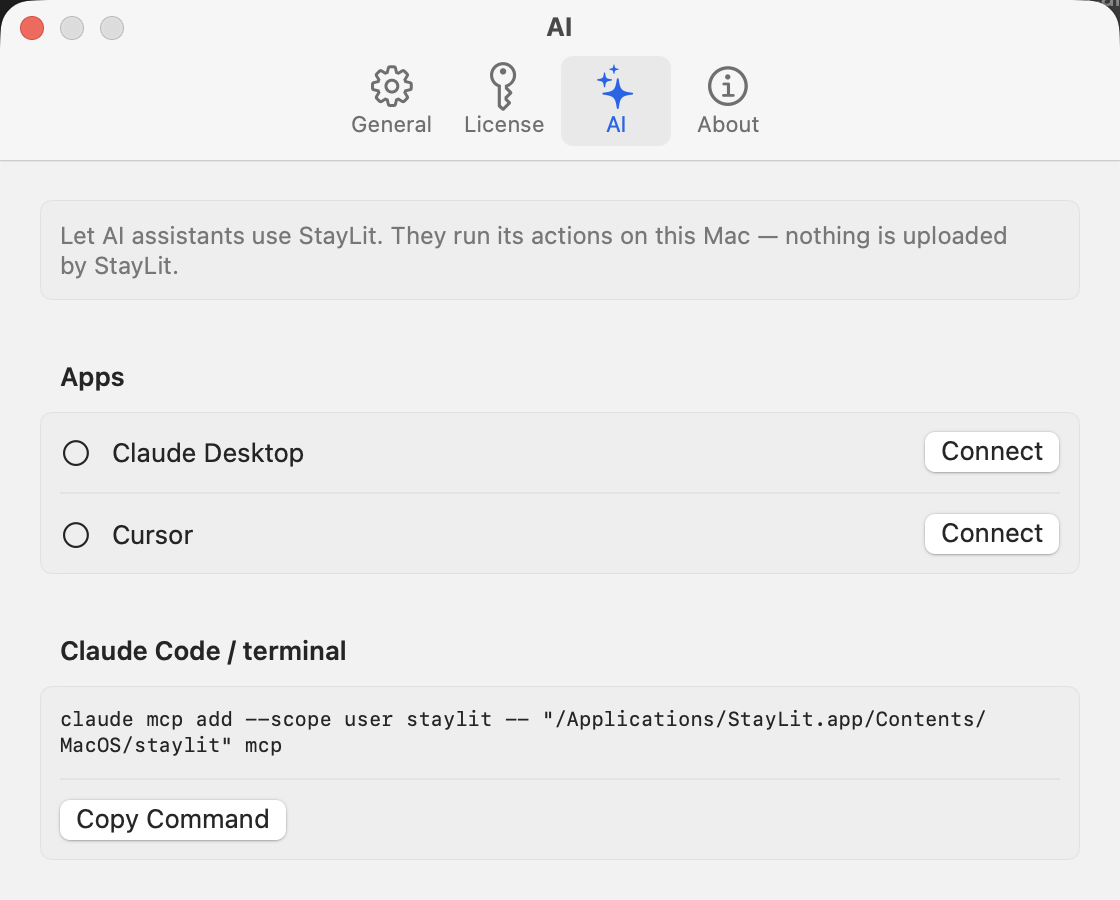
在屏幕最上方的菜单栏点按 Awakelet 图标 → Settings…。点按 AI 标签页。
- 2
点按 Claude Desktop 或 Cursor 旁边的 Connect(连接)。无需输入命令,也不用碰代码。
- 3
完全退出 AI 应用,再重新打开。完成——现在用平常的话提要求就行,例如: “用 Awakelet:让我的 Mac 保持唤醒 3 小时,然后让它睡眠”
Siri 与快捷指令: 操作会出现在“快捷指令”App 的 Awakelet 分类下。
请求示例
05- “用 Awakelet:让我的 Mac 保持唤醒 3 小时,然后让它睡眠”
- “用 Awakelet:保持唤醒,直到 Final Cut 导出完成”
- “用 Awakelet:是什么让我的 Mac 一直不睡眠?”
- “用 Awakelet:晚上 23:30 关掉 Mac”
- “用 Awakelet:不用再让 Mac 保持唤醒了”
面向技术用户:Claude Code、手动配置、工具列表、命令行
Claude Code
设置 → AI → 拷贝命令,然后粘贴到终端。
手动配置 MCP:
{
  "mcpServers": {
    "awakelet": {
      "command": "/Applications/Awakelet.app/Contents/MacOS/awakelet",
      "args": ["mcp"]
    }
  }
}
工具 (6)
工具名称和说明以英文显示——与你的 AI 助手收到的内容完全一致。
| 工具 | 作用 | 会改动文件? |
|---|---|---|
keep_awake | Prevent this Mac from idle-sleeping until a condition is met (whichever comes first): duration, a clock time, an app quitting, a process exiting, or downloads in ~/Downloads finishing. With no condition it stays awake until stop_keep_awake. Optionally sleep or shut down afterwards (1-minute cancellable warning). Replaces any current keep-awake session. | 是 |
stop_keep_awake | Stop the current Awakelet keep-awake session; the Mac sleeps normally again. Does not sleep the Mac and does not cancel a scheduled sleep/shutdown. | 是 |
awake_status | What is keeping this Mac awake right now: Awakelet's session (and time left), any scheduled sleep/shutdown, and every other app or process preventing sleep (e.g. Zoom, caffeinate). Read-only. | 否 |
schedule_power | Put the Mac to sleep or shut it down at a time, independent of keep-awake. The user gets a 1-minute warning and can cancel. Apps are asked to save documents on shutdown. Only one schedule at a time (replaces the previous one). | 是 |
battery_status | Battery charge %, charging / plugged-in state, time left (or to full), cycle count and health. Check before starting a long job on battery. Read-only. | 否 |
cancel_schedule | Cancel a scheduled sleep or shutdown, including the 1-minute countdown after a keep-awake session ends. | 是 |
命令行
awakelet list
awakelet keep_awake --duration 3h --then sleep