




 Awakelet
Claude · Cursor · Siri
Chaque fonctionnalité peut être appelée par un assistant IA. Tout s’exécute localement sur le Mac — l’IA envoie une requête, Awakelet fait le travail, et Awakelet n’envoie rien en ligne.
Awakeletavec votre assistant IA
Connectez votre IA en 3 étapes
03- 1
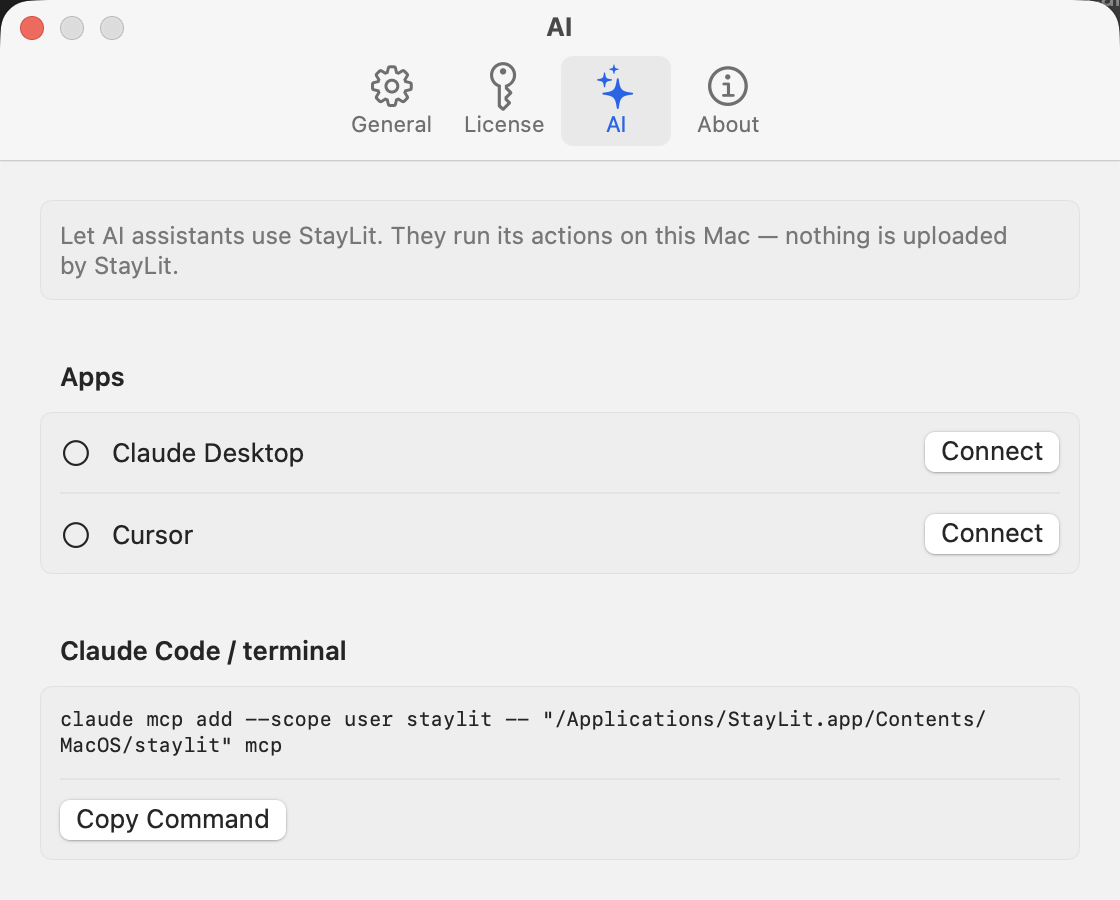
Dans la barre des menus tout en haut de l’écran, cliquez sur l’icône Awakelet → Settings…. Cliquez sur l’onglet AI.
- 2
Cliquez sur Connect (Connecter) à côté de Claude Desktop ou de Cursor. Rien à taper, aucun code.
- 3
Quittez complètement l’app d’IA, puis rouvrez-la. C’est tout — demandez simplement avec vos mots, par exemple : “Utilise Awakelet : Garde mon Mac éveillé pendant 3 heures, puis laisse-le se mettre en veille”
Siri et Raccourcis: Les actions apparaissent dans l’app Raccourcis, sous Awakelet.
Exemples de requêtes
05- “Utilise Awakelet : Garde mon Mac éveillé pendant 3 heures, puis laisse-le se mettre en veille”
- “Utilise Awakelet : Garde-le éveillé jusqu’à ce que Final Cut ait fini l’export”
- “Utilise Awakelet : Qu’est-ce qui empêche mon Mac de se mettre en veille ?”
- “Utilise Awakelet : Éteins le Mac à 23 h 30”
- “Utilise Awakelet : Arrête de garder le Mac éveillé”
Pour les utilisateurs techniques : Claude Code, configuration manuelle, liste des outils, ligne de commande
Claude Code
Réglages → IA → Copier la commande, puis collez-la dans Terminal.
Configuration MCP manuelle :
{
  "mcpServers": {
    "awakelet": {
      "command": "/Applications/Awakelet.app/Contents/MacOS/awakelet",
      "args": ["mcp"]
    }
  }
}
Outils (6)
Les noms et descriptions des outils sont affichés en anglais — exactement ce que reçoit votre assistant IA.
| Outil | Rôle | Modifie des fichiers ? |
|---|---|---|
keep_awake | Prevent this Mac from idle-sleeping until a condition is met (whichever comes first): duration, a clock time, an app quitting, a process exiting, or downloads in ~/Downloads finishing. With no condition it stays awake until stop_keep_awake. Optionally sleep or shut down afterwards (1-minute cancellable warning). Replaces any current keep-awake session. | Oui |
stop_keep_awake | Stop the current Awakelet keep-awake session; the Mac sleeps normally again. Does not sleep the Mac and does not cancel a scheduled sleep/shutdown. | Oui |
awake_status | What is keeping this Mac awake right now: Awakelet's session (and time left), any scheduled sleep/shutdown, and every other app or process preventing sleep (e.g. Zoom, caffeinate). Read-only. | Non |
schedule_power | Put the Mac to sleep or shut it down at a time, independent of keep-awake. The user gets a 1-minute warning and can cancel. Apps are asked to save documents on shutdown. Only one schedule at a time (replaces the previous one). | Oui |
battery_status | Battery charge %, charging / plugged-in state, time left (or to full), cycle count and health. Check before starting a long job on battery. Read-only. | Non |
cancel_schedule | Cancel a scheduled sleep or shutdown, including the 1-minute countdown after a keep-awake session ends. | Oui |
Ligne de commande
awakelet list
awakelet keep_awake --duration 3h --then sleep