




 Awakelet
Claude · Cursor · Siri
Mọi tính năng đều có thể được trợ lý AI gọi. Tất cả chạy cục bộ trên Mac — AI gửi yêu cầu, Awakelet làm việc, Awakelet không tải lên thứ gì.
Awakeletcùng trợ lý AI
Kết nối với trợ lý AI trong 3 bước
03- 1
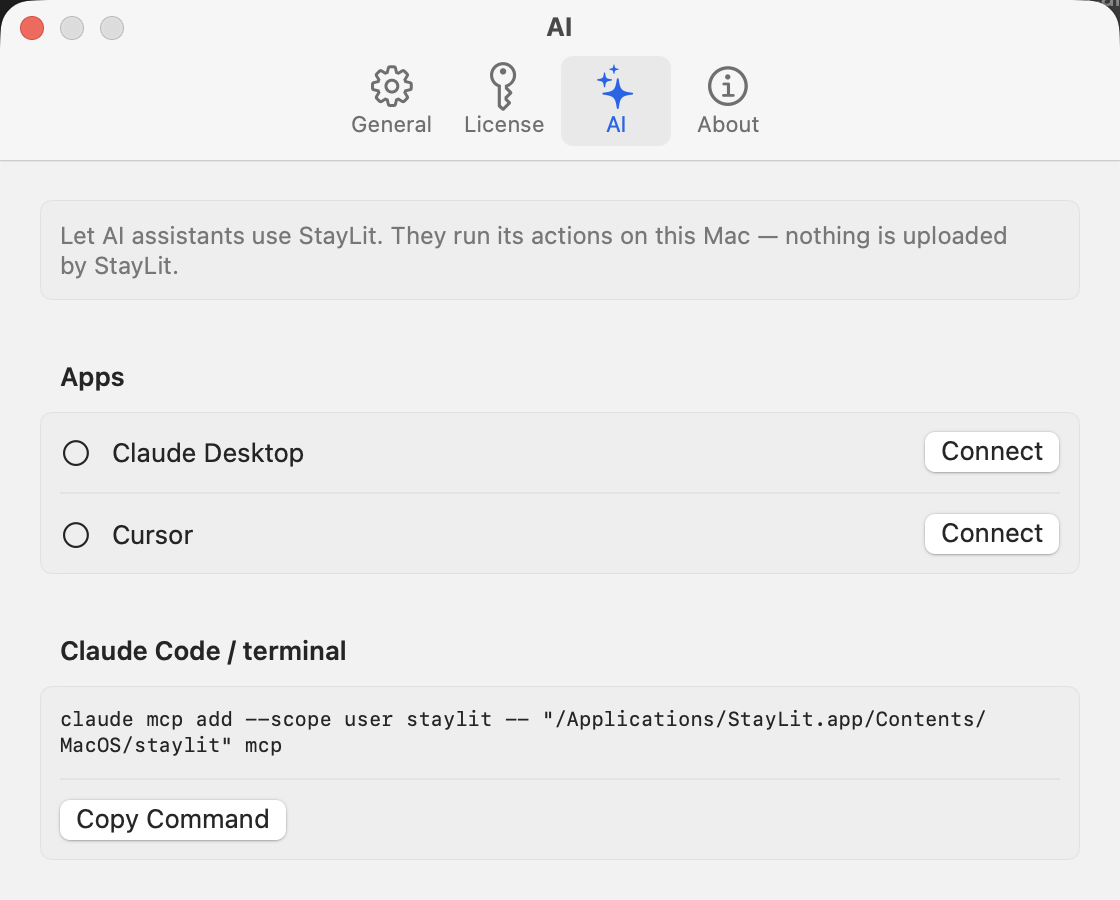
Trên thanh menu ở mép trên cùng màn hình, bấm biểu tượng Awakelet → Cài đặt… (Settings…). Chọn thẻ AI.
- 2
Bấm Connect (Kết nối) cạnh Claude Desktop hoặc Cursor. Không cần gõ lệnh, không đụng tới code.
- 3
Thoát hẳn app AI rồi mở lại. Xong — giờ cứ nhắn bằng lời thường, ví dụ: “Dùng Awakelet: Giữ Mac thức 3 tiếng rồi cho nó ngủ”
Siri và Shortcuts: Các tác vụ xuất hiện trong app Shortcuts, mục Awakelet.
Ví dụ yêu cầu
05- “Dùng Awakelet: Giữ Mac thức 3 tiếng rồi cho nó ngủ”
- “Dùng Awakelet: Giữ máy thức tới khi Final Cut xuất xong”
- “Dùng Awakelet: Cái gì đang giữ Mac của mình thức vậy?”
- “Dùng Awakelet: Tắt Mac lúc 23:30”
- “Dùng Awakelet: Thôi giữ Mac thức nữa”
Dành cho người rành kỹ thuật: Claude Code, cấu hình thủ công, danh sách công cụ, dòng lệnh
Claude Code
Cài đặt → AI → Chép lệnh, rồi dán vào Terminal.
Cấu hình MCP thủ công:
{
  "mcpServers": {
    "awakelet": {
      "command": "/Applications/Awakelet.app/Contents/MacOS/awakelet",
      "args": ["mcp"]
    }
  }
}
Công cụ (6)
Tên và mô tả công cụ được giữ nguyên tiếng Anh — đúng như những gì trợ lý AI của bạn nhận được.
| Công cụ | Chức năng | Thay đổi file? |
|---|---|---|
keep_awake | Prevent this Mac from idle-sleeping until a condition is met (whichever comes first): duration, a clock time, an app quitting, a process exiting, or downloads in ~/Downloads finishing. With no condition it stays awake until stop_keep_awake. Optionally sleep or shut down afterwards (1-minute cancellable warning). Replaces any current keep-awake session. | Có |
stop_keep_awake | Stop the current Awakelet keep-awake session; the Mac sleeps normally again. Does not sleep the Mac and does not cancel a scheduled sleep/shutdown. | Có |
awake_status | What is keeping this Mac awake right now: Awakelet's session (and time left), any scheduled sleep/shutdown, and every other app or process preventing sleep (e.g. Zoom, caffeinate). Read-only. | Không |
schedule_power | Put the Mac to sleep or shut it down at a time, independent of keep-awake. The user gets a 1-minute warning and can cancel. Apps are asked to save documents on shutdown. Only one schedule at a time (replaces the previous one). | Có |
battery_status | Battery charge %, charging / plugged-in state, time left (or to full), cycle count and health. Check before starting a long job on battery. Read-only. | Không |
cancel_schedule | Cancel a scheduled sleep or shutdown, including the 1-minute countdown after a keep-awake session ends. | Có |
Dòng lệnh
awakelet list
awakelet keep_awake --duration 3h --then sleep